 Warranty Drawer
Warranty tracker app
Warranty tracker app: snap the receipt. It's filed. You'll be reminded.
Warranty Drawer is a warranty tracker app that reads the receipt, the warranty card or the product label, pulls out the merchant, date, price, warranty term and serial, works out the expiry and reminds you 30, 7 and 1 days before it lapses. The dishwasher that dies at month eleven gets fixed on the maker's money.
- Free for 10 items, no card
- Works with no account
- Photo read on the phone
- Nine languages
 Scan to open this page on your phone and get the app.
How it works
A warranty tracker app where a photo is the whole job
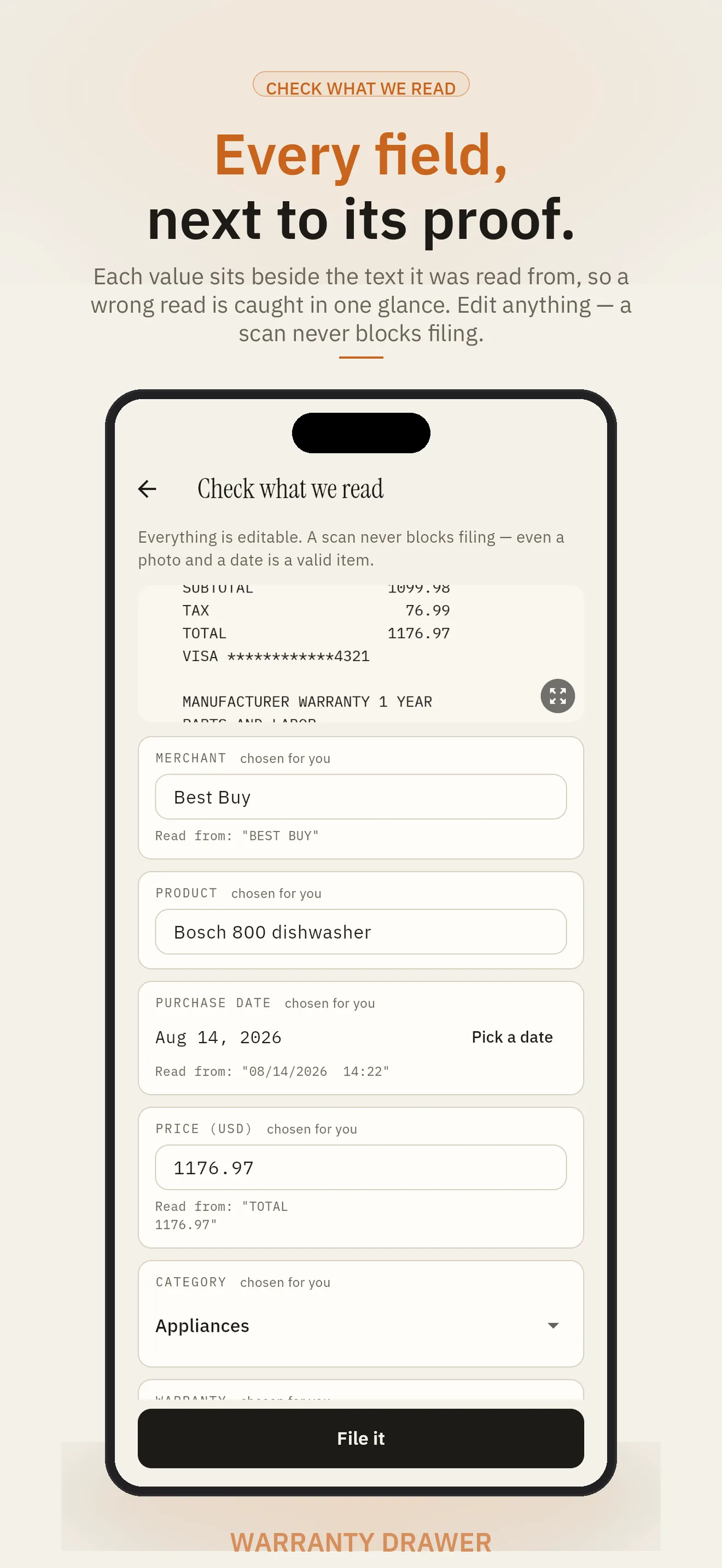
No forms. Point the phone at the paper, check what it read, done. Every field stays editable and a scan never blocks filing: an item with only a photo or a name is fine.
Snap
Receipt, warranty card, serial plate or the product itself. The text is read on the phone first, so it works in the store with no signal.
Check the read
Merchant, product, purchase date, price, warranty term, serial, category. Each field shows the text it came from; anything assumed is labelled, never guessed silently.
Filed and clocked
The item lands under its category with an expiry date. Reminders 30, 7 and 1 days before. Add a return-window or extended-plan clock when you need one.
What the drawer keeps
Everything you'd need on the day something breaks
A receipt organizer for the proof of purchase
The photo, zoomable, with the merchant, date and price read off it. Save it back to your photos or share it with the repair shop.
When each warranty ends
Read from the paper when it is printed there; otherwise the brand's published standard term, then the category default, always labelled. EU and UK buyers get the 24-month floor.
30, 7 and 1 days before
A notification for every clock, including return windows and extended plans. No account, no network, nothing to set up.
Is anything I own recalled?
Your items are checked against the public CPSC list, and NHTSA for a vehicle, on the phone. A match shows the notice. Nothing about your items is sent anywhere.
One drawer for the house
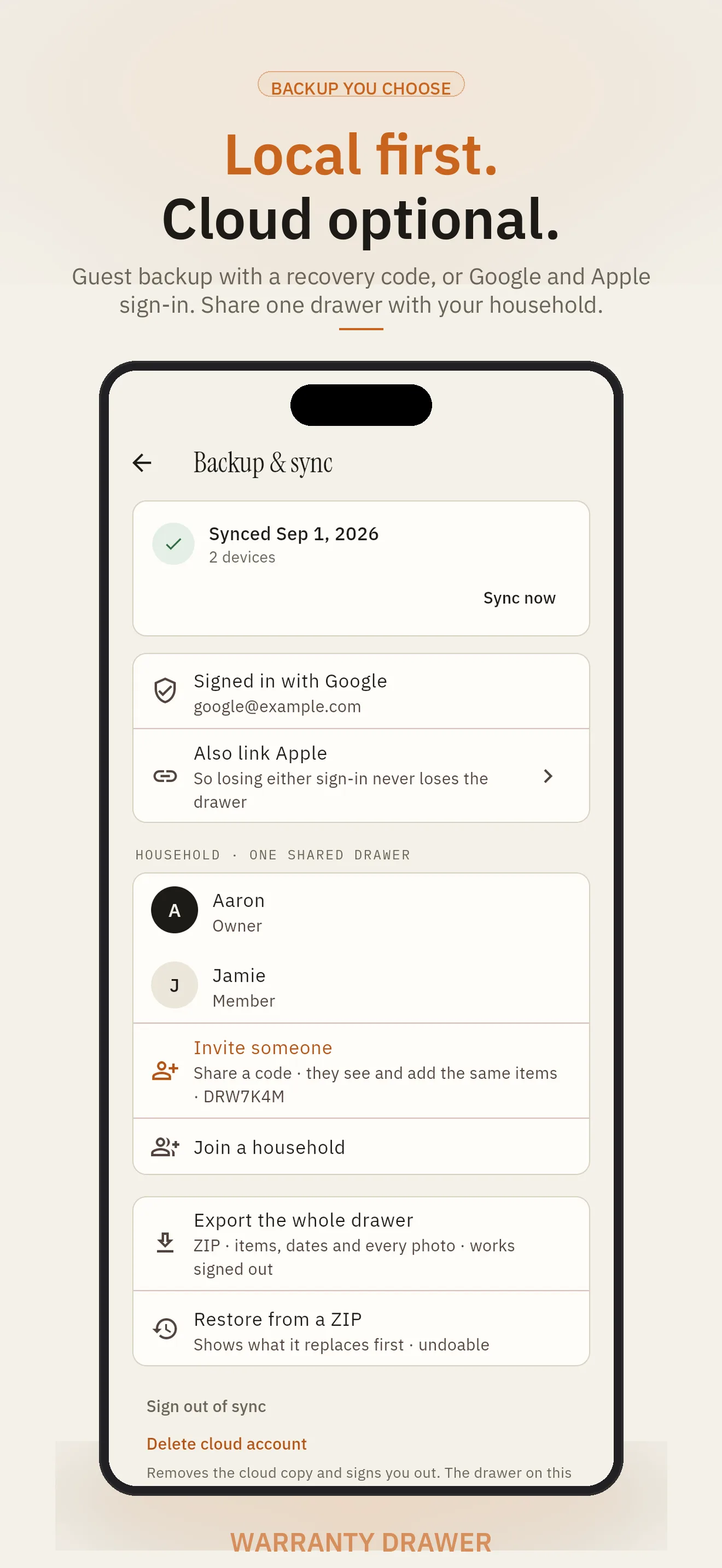
Invite someone with a code or a QR; everyone who joins sees and adds the same items. Free, and anyone can leave.
When it breaks
A dated evidence PDF of the photos and fields with a claim letter written around the defect you describe, shared from the item. Part of Warranty Drawer+.
Free warranty lookup
How long is the warranty on…?
The manufacturer's published standard term for 29 brands, by product type, each with the maker's page and the date we checked it. The same table fills in a term when your receipt is silent.
- Apple
- Samsung
- LG
- Dyson
- Bosch
- DeWalt
- Milwaukee
- Makita
- Ryobi
- Craftsman
- Black+Decker
- KitchenAid
- Cuisinart
- Instant Pot
- Keurig
- Vitamix
- GE Appliances
- Frigidaire
- Maytag
- iRobot
- Weber
- Traeger
- Bose
- Sony PlayStation
- Nintendo
- Microsoft
- Canon
- Garmin
Every brand and product type · Standard US terms; your receipt, an extended plan or local law can change them.
Open your drawer in a browser
The same drawer on the laptop
Filing happens at the kitchen counter with a phone. Finding the serial for the repair ticket, or the receipt the insurer wants, happens at a desk.
- Sign in with Google
- Sign in with Apple
- Guest with a recovery code
- Turn on Backup & sync on the phoneSettings, then Backup & sync. Sign in with Google or Apple, or stay a guest and keep the recovery code it gives you.
- Open the web drawer and sign in the same wayAt warrantydrawer.adelyons.com/app. The same account, the same drawer.
- Search, read, add, exportEvery item with its photos and clocks; search by merchant, product, price or status; add an item by hand; invite the household; export.
Reading a receipt by camera and the reminders stay on the phone. The web edition never sees a drawer you did not sync.
Local first
The account is a backup, never a gate
Snap, read, file, search, remind and export need no network and no account. The drawer lives on your phone in a database you can export as a ZIP at any time.
Text is read on the phone. Only that text, never the photo, goes out for a second pass when you are online, and the photo only if you tap Read the picture instead. Sign in to back up, restore on a new phone, share a household drawer and open the web edition; delete the cloud account and the phone keeps its drawer. Privacy policy.
No account needed
The free app is complete on the phone, forever.
Photo stays home
Read on the device; sent only on your explicit tap.
ZIP export
Items, clocks and photos, signed in or not. Restore says what it replaces.
Delete the cloud copy
One tap removes the account; the phone's drawer stays.
Keep it on your phone
The browser finds it. The phone files it and reminds you.
The camera, the reading and the reminders are the product. The web edition is where you look things up.
- Reads the receipt on the phone, offline, in the store
- Reminders 30, 7 and 1 days before every clock
- Recall alerts for the things you own, checked on the phone
- Photo library: save or share any receipt photo
- Household invite by QR, phones held together
- ZIP backup and restore of the whole drawer
Warranty Drawer+ adds unlimited items, several photos per item, return-window and extended-plan clocks, the claim helper and a household inventory export, at the price the store shows.
🎁 A free month for you and a friend
Invite a friend from the Warranty Drawer phone app and you both get 30 days of Warranty Drawer+, free.
- Install Warranty Drawer on your phone.
- Open Invite a friend and share your code.
- Got a code from a friend? Enter it under Have an invite code? within 14 days of installing.
Invites are redeemed in the phone app. How invites work
Free tools
Two things to check before you call support
Is it still under warranty?
Pick the brand and product type, enter the purchase date, and see when the manufacturer's standard term ends, with the source.
Look up a warranty term →Has it been recalled?
Type what you own and check it against the public CPSC recall list in your browser. Nothing is uploaded.
Open the recall checker →Guides
For the drawer of receipts kept "just in case"
- How to find your warranty expiry dateReceipt, card, serial number, or the brand's standard term, in that order.
- Keeping receipts for warranty claimsWhat a claim actually needs, and how to keep it without a shoebox.
- How to check if a product is recalledCPSC, NHTSA and the maker's own page, and what to do when it is.
- Return window vs. warrantyTwo different clocks, and why the first one matters more in month one.
- Warranty claim letter templateWhat to write, what to attach, and where to send it when something breaks.
Questions
Before you file the first receipt
What does a warranty tracker app do?
It keeps the proof of purchase and the warranty term for the things you own, works out when each warranty ends, and reminds you before it does, so a dishwasher that dies at month eleven gets fixed on the maker's money, not yours. Warranty Drawer reads the receipt for you and files the item under a category with its expiry date.
How does it know the warranty length?
First from the paper: a term printed on the receipt or warranty card is read and used. When the paper is silent, Warranty Drawer uses the manufacturer's published standard term for that brand and product type (29 brands, each with the maker's page and the date it was checked), then the category default, and always labels which one it assumed. In the EU and UK the 24-month statutory floor applies.
Does the receipt photo leave my phone?
Not by default. Text is read on the phone; only that text, never the photo, is sent for a second pass when you are online. The photo itself is sent only if you tap Read the picture instead. Without an account, the whole drawer stays on the phone.
Do I need an account?
No. The phone app works fully with no account. An account is a backup and a bridge: sign in with Google or Apple, or stay a guest with a recovery code, to restore on a new phone, share a household drawer, and open the same drawer in your browser.
What can I do in the browser?
Sign in with Google, Apple or your recovery code and see every item with its photos and clocks, search and sort, add or edit an item, join or invite a household, and export. Reading a receipt by camera and the reminders stay on the phone.
Will it remind me before a warranty expires?
Yes, on the phone: a notification 30, 7 and 1 days before each warranty ends, and the same for a return window or an extended plan if you add those clocks. Reminders need no account and no network.
What are recall alerts?
Warranty Drawer checks your filed items against the public CPSC recall list and, for a vehicle, NHTSA, on the phone, and tells you when a model you own appears, with the link to the notice. Nothing about your items is sent anywhere to do it.
Can my whole household use one drawer?
Yes. From Backup & sync, invite someone with a code or a QR; everyone who joins sees and adds the same items. Anyone can leave at any time. Household sharing is free.
Is Warranty Drawer free?
Ten filed items, one photo each, the full receipt reading, reminders, recall alerts, household sharing, ZIP export and the web edition are free with no card. Warranty Drawer+ adds unlimited items, several photos per item, return-window and extended-plan clocks, a claim helper with an evidence PDF, and a household inventory export, at the price the store or Stripe shows.
What happens to my data if I stop using it?
Export the whole drawer, items, clocks and photos, as a ZIP at any time, signed in or not. Deleting the cloud account removes the cloud copy and keeps the phone's drawer.
The money you'd otherwise leave on the table.
Open your drawer in the browser, or put Warranty Drawer on the phone that is with you at the checkout.